
 Deutsch
Back up and
move your mail
Switch providers without losing a single message, or back up your mailbox before you cancel it. Free, for macOS, Windows and Linux.
Version 0.2.2. All systems and checksums

One file per message
A backup is an ordinary folder: one .eml file per message, sorted like your account. Every mail program opens these files, with or without IMAP Transfer.
- After the first run, only new mail is fetched.
- Mail you delete in the account stays in the backup.
- An mbox export takes everything to Thunderbird or Apple Mail.
anna@example.com/
├── README.txt
├── imaptransfer.db
└── mail/
    ├── INBOX/
    │   ├── 2024-05-03_Invoice May_3f2a9c01b4.eml
    │   └── 2024-05-06_Lunch on Friday_8c41d27e90.eml
    ├── Archive/
    │   └── 2023/
    │       └── 2023-11-20_Contract_b7e0a5f312.eml
    └── Sent/
        └── 2024-05-04_Offer for the garden_51d9c0e6a8.eml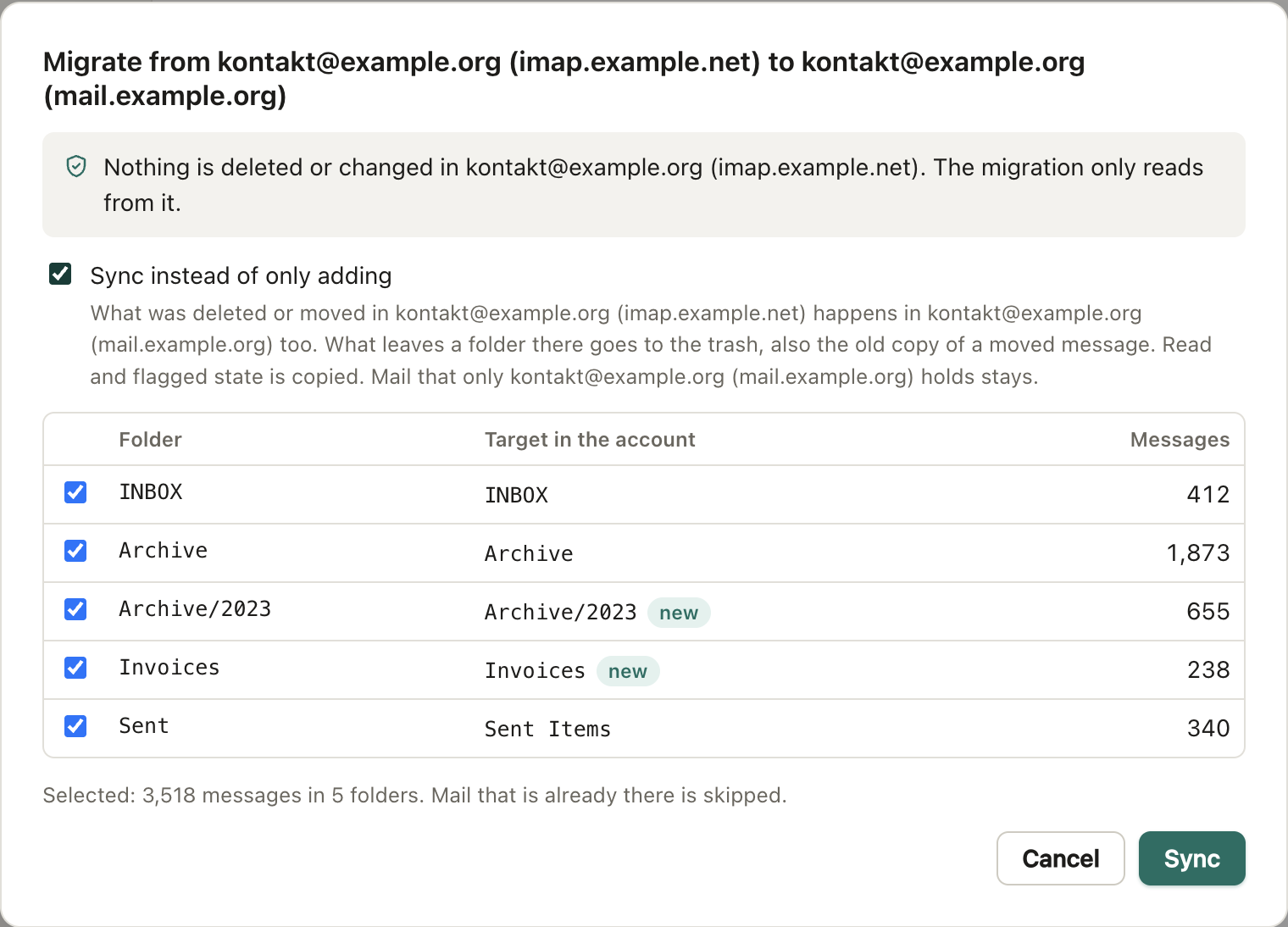
From provider to provider
Choose the target account, and IMAP Transfer shows every folder and where it goes: Sent becomes Sent Items, a missing folder is created. Mail that is already there is skipped.
The old account stays as it is. The migration only reads from it.
Until you have switched over, Sync keeps the new account in step with the old one: what you delete or move there happens here too.
Before you ask
Stop whenever you like
Close the laptop or lose the connection: the next run continues where the last one ended, without a single duplicate.
Duplicates cleaned up
A test run lists every exact copy and changes nothing. Only then do you decide; one of each message stays.
Any IMAP provider
Gmail, Outlook, iCloud, GMX, WEB.DE, T-Online, IONOS, Posteo and every other. The app knows their settings and tells you what to prepare.
Gmail labels kept
A message with five labels is stored once and goes back into all five when you restore it.
On the command line
The same engine runs on servers, NAS boxes and from cron, as imaptransfer. It needs Node.js 22.18 or newer, or Docker.
Exit codes tell a script what happened: 0 done, 2 done but some messages failed, 1 failed, 130 stopped.
# Back up; later runs only fetch what is new
npx imaptransfer backup ~/Backups/anna --user anna@example.com

# Every night at 2:00 (crontab -e)
0 2 * * * imaptransfer backup /srv/backups/anna --user anna@example.com --password-file /root/.anna-imap --quiet

# Move an account and keep it in step
imaptransfer migrate --from-user anna@example.com --to-user anna@example.org --sync

# On a NAS
docker run --rm -v /volume1/backups/anna:/backup -e IMAPTRANSFER_PASSWORD \
  ghcr.io/sebastian-scherhans/imaptransfer backup /backup --user anna@example.com
Download
Version 0.2.2, released on 30 October 2026. Checksums: SHA-256.
IMAP Transfer is free, and liability is limited accordingly. Back up your mail before you restore, migrate, sync or clean up. About liability
macOSYour system
A disk image. Apple silicon for Macs with an M chip, Intel for older Macs.
-
Apple silicon
121 MB
93d16418404a41d643098a2ad4d7c96d 73c457081f62e0ba 0a16c5a9b2d7f862 -
Intel
128 MB
52d10f1c01228dba12b572c65bd17ae4 c20897cb31c643d4 f7451f9d8573ff91
WindowsYour system
An installer. Intel and AMD for most PCs, ARM for laptops with a Snapdragon chip. We have applied to the SignPath Foundation for code signing; until then Windows warns when you start the installer.
-
Intel and AMD
122 MB
e670e461c676dc9b4cf0a0c94179ad93 5a5d951bb04c4e5c e7f7d78d3fda81ac -
ARM
116 MB
4d7df99d688304701b71b6a2e37b2392 8ca6f8d63c99c9fb 7597b240207a889f
LinuxYour system
The AppImage runs almost anywhere, the .deb package on Debian and Ubuntu.
-
AppImage, x64
126 MB
6f9d6b7026ab79eaca3bf4cd9eda08bf 63887edfa8c23268 36fec95a0b6cf40e -
.deb, x64
101 MB
d86b52c33da0e2d6a203b7b4df1a5118 2170dc89d7869dae 7ea9f6cd29426b49 -
AppImage, ARM64
128 MB
e1954aa48ab79ea104c3f276c0e04471 2f500ffa0694186c e7b9924a418c223c -
.deb, ARM64
96.2 MB
0fd5978724e1e194d45b8228f824eb82 b671a03ba58d3799 ed3f2fe7ca3906df
Check the file
Drop the downloaded file here, or choose it. Your browser computes the checksum itself and compares it with the checksums above; the file does not leave your computer.
Or in a terminal:
- macOS
shasum -a 256 ~/Downloads/imaptransfer-0.2.2-mac-arm64.dmg - Windows (PowerShell)
Get-FileHash $HOME\Downloads\imaptransfer-0.2.2-windows-x64.exe - Linux
sha256sum ~/Downloads/imaptransfer-0.2.2-linux-x86_64.AppImage